
Starting and Stopping an Amazon AWS Instance from a Windows Python Program
Sometimes you end up with a situation where you want to start (or stop) an Amazon AWS instance from your own program instead of using the AWS interface. It’s those occasions where something weird is going on in your systems when you want to handle a problem magically rather than having to go to the AWS management console.
There’s a Python module named boto3 that provides Python access to a variety of functions in AWS. Some of the functions let you control EC2 instances, but there are other functions to control AWS features such as S3. But let’s just focus on starting and stopping an AWS instance. First, we need to install boto3 if we haven’t already:
pip install boto3
Geeks can review the boto3 source code at Github.
Once you’ve got boto3 installed then you’ve taken a good step toward success. The configuration documentation tells you that you can create a Shared Credentials File on your local drive. The docs tell you “The shared credentials file has a default location of ~/.aws/credentials”. But if you’re on Windows then you can’t create a directory or folder name that begins with a period. What?!? What to do? Darn it!
On Windows, you can put your credentials into a text file and specify the path to the file in the environment. But to do that, you have to know how to set an environment variable. Let’s look at how to do just that:
import os

os.environ["AWS_SHARED_CREDENTIALS_FILE"] = 'C:\\credentials.txt'
The contents of your credentials file is pretty straightforward:
[default]
aws_access_key_id=your_key_id
aws_secret_access_key=your_secret_access
Hop on into your EC2 console. Click on your name in the top right to access the link to My Security Credentials.
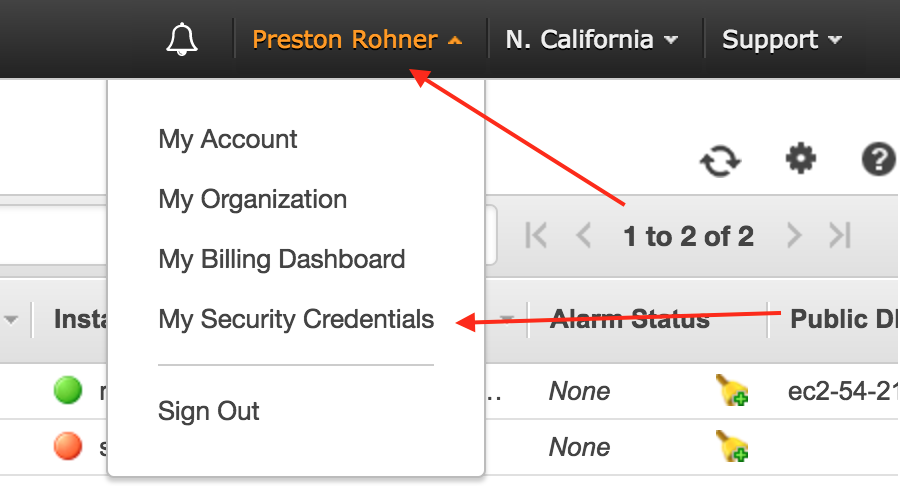
Go ahead and click on Continue to Security Credentials because you’re feeling brave. You’ll get through this. Go ahead and click on Access Keys (Access Key ID and Secret Access Key) to expand that section. Then continue your foolhardy bravery by clicking on Create New Access Key. In the dialog that pops up you can Show Access Key and the kind folks from Amazon provide you with the Access Key ID and Secret Access Key that you can just paste right into your credentials file. Personally I found this part the most difficult to figure out. Once you’ve got the credentials setup you can move right into some code.
Connecting to your instances involves a few basic steps:
#Some basic setup
import boto3
from botocore.exceptions import ClientError
AWS needs to know your region. We can set that in for the session. I found the region name for my instances in the EC2 console. Note that in the console my region is “us-west1c” but boto3 actually wanted just “us-west1” without the “c”.
boto3.setup_default_session(region_name='us-west-1')
ec2 = boto3.client('ec2')
Once you have your ec2 variable properly initialized then you can use it to communicate with EC2. For example:
response = ec2.describe_instances()
will return to you the list of your instances along with some status information. Once you know the status of your instance then you can decide what to do with it. You can iterate through the response object and its contents to view the properties you want. It’s not really rocket surgery.
Here’s the full example program:
# pip install boto3
# https://github.com/boto/boto3

# http://boto3.readthedocs.io/en/latest/guide/configuration.html
import os

os.environ["AWS_SHARED_CREDENTIALS_FILE"] = 'C:\\Users\\Administrator\\PycharmProjects\\AWS\\credentials.txt'

def toggle_instances(ec2, instance_list, dry_run, current_status_name):
    was_successful = False
    try:
        if current_status_name == 'stopped':
            response = ec2.start_instances(InstanceIds=instance_list, DryRun=dry_run)
        else:
            response = ec2.stop_instances(InstanceIds=instance_list, DryRun=dry_run)

        if not dry_run:
            was_successful = True
    except ClientError as e:
        if dry_run and e.response['Error'].get('Code') == 'DryRunOperation':
            was_successful = True
        else:
            print(e)

    return was_successful

# http://boto3.readthedocs.io/en/latest/guide/ec2-example-managing-instances.html
import boto3
from botocore.exceptions import ClientError

boto3.setup_default_session(region_name='us-west-1')
ec2 = boto3.client('ec2')

# http://boto3.readthedocs.io/en/latest/reference/services/ec2.html#client
response = ec2.describe_instances()
for reservation in response['Reservations']:
    for instance in reservation['Instances']:
        instance_id = instance['InstanceId']
        key_name = instance['KeyName']
        platform = instance['Platform']
        status_code = instance['State']['Code']
        status_name = instance['State']['Name']
        availability_zone = instance['Placement']['AvailabilityZone']
        print('{:30} {:10} {:3} {:15} {}'.format(key_name, status_name, status_code, availability_zone, platform))
        if key_name == 'Windows Server 2012 R2':
            # if this is my test server then we'll toggle its state
            print("\tToggling status of {}".format(key_name))
            if toggle_instances(ec2, [instance_id], True, status_name):
                toggle_instances(ec2, [instance_id], False, status_name)
Are you trying to control AWS instances programmatically? How are you approaching these problems?